NBN address checker. If you want to know whether the nbn service is available at your home address, or what nbn technology is provided at your residence, you can enter your address into our address checker on the MATE nbn page. This will tell you whether or not the nbn service is available at your home, and what nbn technology you will have access to.

Use promo code MATE25
Over 2,500 5-star reviews

Use promo code MATE25
Over 2,500 5-star reviews

Bundle to save more
Bundle a mobile plan to save even more! Get a further $10 per month off this plan when you bundle your MATE nbn internet plan with a MATE mobile plan - simply add your mobile plan in the cart!
More information1-month money-back guarantee
If you are not completely satisfied with your MATE nbn internet service during the first month of connection, we will provide a full refund of your plan fee.
Terms and conditionsAdd a home phone service
Add an nbn home phone (VoIP) service to your plan for just $9 per month. Enjoy unlimited calls to local, national, and mobile numbers.
Critical Information SummaryDo you need a modem or router?
- nbn ready device
- Wi-Fi 6 and Wi-Fi 7 options
- Supports all NBN connection types
- Multiple device support
- Advanced security features
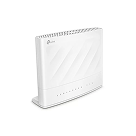
Our TP-Link VX230v is best for homes with copper-based nbn connections like FTTN or FTTB, or if you need a home phone.
$165.00Modem info Delivery time Statement of Compliance
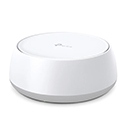
Our TP-Link HB210 Pro is ideal for nbn connections like FTTP, HFC, FTTC or Fixed Wireless where no home phone is required.
$165.00Modem info Delivery time Statement of Compliance
Need a modem?
BYO modem or add our ready-to-go TP-Link VX230v modem when signing up ($165)
In most cases, our ready-to-go modem will arrive after your internet service is activated. More info here.
How we do things around here
-

No contracts, ever
-

Unlimited data
internet plans -

All Aussie based support
-

No setup fee on BYO
modem plans -

1-month money back guarantee
Frequently asked questions
Do you really offer unlimited data nbn plans?
Yes, all MATE nbn plans come with unlimited data. There's no data limits and we won't reduce your internet speed after you've hit a certain cap either. We hate surprises and that goes for your bills too. You'll only pay for your plan's cost, not your usage. Plus, with no lock-in contracts there are no extra fees if you change plans if you want lower or faster speeds.
What's more, all our plans come with a money back guarantee. This means if you're not entirely in love with your internet service within the first month, you'll get all your money back if you cancel (terms and conditions apply). With no lock-in contracts, and a money-back guarantee, you can try MATE risk-free. That's how confident we are in the satisfaction guarantee we bring to our customers. At MATE, we believe in providing a fast, cheap, and reliable nbn internet connection, making us the ideal choice as your home internet provider.
What nbn plan should I get?
Choosing the right nbn plan depends on how many people are in your household, how you use the internet, your lifestyle and the speed needed to support you working from home. Unsure which is right for you? Review our guide:
- Casual browsers & small households with 1-2 people → Try our Crikey nbn 25/10 plan - perfect for social media, browsing, and a bit of streaming.
- Medium users & families no more than 2-3 people → Go for our Ripper nbn 50/20 - ideal for 720p HD streaming, online meetings, and everyday usage.
- Seasoned web surfers & homes with up to 4-5 people → The No Worries nbn 100/20 plan gives you the speed for 4K streaming, large downloads, and gaming.
- Heavy users & households with 4-5 users → Choose You Beaut nbn 100/40 - great for uploading larger files, working from home, or gaming.
- Large families or households with 6+ users → Choose No Worries nbn 500/50 - great for streaming 4K video, uploading larger files, working from home, or gaming.
- Users with demanding needs & families with over 7 people → Step up to Fair Dinkum nbn 750/50 for souped-up speeds for streaming in 4K, running online businesses and households with flatmates sharing a single broadband service.
- Serious speed seekers & households with over 7 people → Switch to the Flamin' Fast nbn 1000/100 - our top-tier plans for families, home businesses and flatmates who expect the best.
Each of our nbn broadband plans features a choice of speeds. Luckily for you, every MATE nbn internet plan comes with unlimited data, no lock-in contracts, zero setup fees and Aussie support.
What are the typical evening speeds of MATE's internet plans?
We never leave MATES hanging. Depending on your nbn broadband plan, you can expect to experience the following speeds during peak evening periods - 7 pm to 11 pm:
- Crikey nbn 25/10 plan: 25Mbps download / 10Mbps upload
- Ripper nbn 50/20 plan: 49Mbps download / 19Mbps upload
- No Worries nbn 100/20 plan: 97Mbps download / 19Mbps upload
- You Beaut nbn 100/40 plan: 97Mbps download / 36Mbps upload
- No Worries nbn 500/50 plan: 485Mbps download / 46Mbps upload
- Fair Dinkum nbn 750/50 plan: 719Mbps download / 46Mbps upload
- Flamin' Fast nbn 1000/100 plan: 831Mbps download / 96Mbps upload
These speeds are what you can typically expect during the evening when the network is busiest - so you can stream, game, work and browse with confidence, even in peak times.
What is MATE's cheapest internet plan?
Our Crikey 25/10 nbn plan is our most affordable service and a boon for casual internet users, students and small households. You'll get speeds to keep you studying, streaming music and basic HD video while enjoying unlimited, uncapped data at the lowest price. Plus, if you Bundle a Mobile Service, you'll score $10 off your monthly bill - that's a $120 saving every year.
What is an nbn Home Phone Bundle?
Our nbn Home Phone Bundles are an easy and affordable way to stay connected to your mates online and over the phone. For an extra $9 a month, you can add a VoIP home phone to your service and enjoy unlimited calls to Australian home phones and mobiles.
Does MATE offer internet plans for businesses?
We don't have dedicated company accounts. But who needs them when our residential nbn plans offer high-speed capacities and unlimited data? With no lock-in contracts and flexible month-to-month contracts, you can enjoy reliable internet to support your operations. The best nbn plans for home businesses, small businesses, remote workers and home offices you should consider include:
How does the connection type affect my internet service?
Your nbn connection type plays a big role in the range of speeds your home internet can achieve. The technology used to connect your home - generally a combination of fibre optic cables with either copper line cables or Hybrid Fibre Coaxial (HFC) is owned, operated and installed by the NBN Co., which is outside MATE's control.
Here's a quick breakdown of the main nbn connection types:
- FTTP (Fibre to the Premises): Considered the gold standard, FTTP uses end-to-end fibre optic cables straight to your home, offering the fastest and most reliable speeds available. If you have another type of connection, you may be eligible for an nbn fibre upgrade depending on where you live and your nbn plan.
- FTTC (Fibre to the Curb): Optic fibre runs to a telecommunications pit on the footpath in front of your house, before the signal is transmitted via copper cabling. As most homes are generally within 100 metres of the kerb, this connection usually offers a better performance than FTTN.
- FTTN (Fibre to the Node) involves installing fibre optic cables from a fibre distribution hub to a node in a residential street, where the transmission is completed using copper wires for the final stretch. While speeds can vary depending on how far your home is from the node, it still offers a great performance to keep you connected.
- HFC (Hybrid Fibre Coaxial): Fibre optic cables are installed to a local node, before coaxial cables transmit the internet to your home. HFC uses a smaller proportion of existing infrastructure that FTTN and its technology is shielded, helping to prevent signal loss, offering a better overall performance.
- FTTB (Fibre to the Basement): Most often installed in apartment and multi-dwelling buildings, fibre optic cabling is connected to the building’s basement where existing wiring carries the internet to each unit. In older buildings, copper telephone wires may transmit the internet signal, where newer blocks, tend to use ethernet cabling, offering a connection with close to FTTP speeds.
- Fixed Wireless & Skymuster Satellite: Harnessing a technology similar to the 4G mobile network, Fixed Wireless connections use ground-based base tower stations to provide a fixed wireless signal to homes in regional and rural areas. MATE does not offer Skymuster Satellite, which transmits internet connectivity from two satellites.
What should I look for when comparing plans between internet providers?
Selecting an internet service provider in Australia can be overwhelming, but when it comes to comparing internet plans, it's not just about price-you want value and reliability. Here's what to keep an eye on:
- Speed: Look for both download and upload speeds that match your household’s needs, especially if you stream, game, or work from home. At MATE, we’ve got you covered with plans ranging from 25Mbps with Crikey nbn 25/10 to a whopping 831Mbps with our Flamin’ Fast nbn 1000/100.
- Data limits: Focus on unlimited plans that give you the freedom to use your service without getting caught short. All MATE nbn plans include unlimited data, which means there are no hidden limits or reduced speeds after hitting a cap.
- Contract terms: Choose providers that offer flexibility, so you’re not stuck if things don’t work out. We don’t just want to be your service provider—we want to be your MATE. That’s why there are no sign-up fees or extra charges if you switch plans or transfer your service if you move homes. Plus, with no lock-in contracts, you’re free to stay because you love our service, not because you have to.
- Local support: Look for providers who want to answer your questions, not just sales calls. That’s why our support teams are based in Australia and have the local knowledge to address all your queries.
- Bundling discounts: Some providers (like MATE!) offer great savings when combining service packages. We heard you call our name—when you bundle your nbn with a mobile service, you’ll get rewarded with a continuous $10 discount on your monthly bill—that’s over $120 in savings every year on top of our already competitively priced plans.
So what are you waiting for? With no lock-in contracts, 100% Australian support, no plan change fees, unlimited data on all internet plans, it's time to make the switch to MATE!
Do I need a modem for my MATE internet plan?
Yes, you need a modem, router or modem router to connect to any internet plan. At MATE, our BYO modem policy allows you to use your own devices without additional costs-you'll just need to connect it to our network.
If you don’t have a compatible modem or it’s a bit old and it’s time for an upgrade, we can provide our ready-to-go TP-Link VX230v modem when signing up for a one-time fee of $165. It’s ready to go right out of the box and deliver and get you connected with super-fast download speeds in no time
Do I need to be home for the nbn technician to install the service?
If your home has already been connected to the nbn, there’s no technician required. We can simply transfer the service, which can be as quick as a few hours, but may take up to 3 business days.
If an nbn service hasn’t previously been connected to your property, a member of your household who is over 18 years old needs to be home while a technician installs the nbn modem and nbn connection box. During their visit (generally four hours), you can ask for the nbn equipment to be installed in your preferred location, as long as it will work to nbn installation standards.
How long does it take to get connected to the nbn service?
If your property hasn’t had an nbn connection before, the time it takes to get an activation appointment can vary from 9 to 19 business days, depending on the workload of the nbn technicians and your property’s readiness. But don’t worry, we always aim to secure the next available appointment, unless you specify otherwise.
If your property is already connected to the nbn network, then it’s likely we can activate your service within 1-3 business days once you’ve placed your order. However, please note that this may not always be possible as it depends on various factors like having the required equipment on-site and the type of nbn technology used at your property.
Can I keep my existing phone number when switching to the nbn service?
As long as your landline number is currently active with another provider, we should be able to transfer it to MATE. Just be aware that the transfer process can take between 2 to 6 weeks to complete and it won't begin until your nbn internet service is activated with us
It's very important that you keep your landline phone number active with your current provider until we confirm the port is complete. If your provider cancels or disconnects your landline during the porting process, we won't be able to complete the transfer and you will lose your number.
Once your service is activated, you'll need a compatible VoIP device or modem to use our nbn Phone service. Please note that we don't offer support for configuring BYO VoIP devices
Can I bundle my nbn service with other services?
Yes! MATE takes the hassle out of staying connected by allowing you to bundle nbn internet plan and mobile plan in the one go.
We get it, having all your plans under one provider is super convenient! That’s why we offer a bunch of nbn + mobile packages to choose from. You can mix and match the plans that fit your lifestyle the best. If you’re curious about how to personalise your nbn + mobile package, head over to our nbn plans page or give our friendly Aussie customer service team a buzz at 13 14 13 today.
How to compare and choose the right nbn plan
Find the nbn plan that fits – without paying for speed you don’t need. Choosing an nbn plan doesn’t need to be complicated. Work out what speed you need, what you actually use the internet for, and what you can leave out. Here’s how.
nbn Speed Tiers Explained
MATE’s nbn plans come with unlimited data. What sets each apart is the internet speeds made available. Here’s what each one actually delivers and who should get it:
| Speed Tier | Maximum Download Speed | Good For | Who Should Get It |
|---|---|---|---|
| nbn 25 | 25Mbps | Browsing, email, SD streaming, social media | Singles or couples, light users, budget-conscious. Best for 1–2 people. |
| nbn 50 | 50Mbps | HD streaming, video calls, casual gaming, multiple devices | Most households. Best for 2–3 people. |
| nbn 100 | 100Mbps | 4K streaming, gaming, large downloads, heavy multitasking | Families and busy households. Best for 4–5 people. |
| nbn 500 | 500Mbps | Multiple 4K streams, professional work, large file transfers | Power users, content creators, larger households. Best for 6+ people. |
| nbn 750 | 750Mbps | Heavy simultaneous use, professional-grade performance | Power users and large households who need consistent high speeds. Best for 7+ people. |
| nbn 1000 | 1000Mbps | Everything at maximum speed | High-demand households, streamers, gamers, remote workers. Best for 7+ people. |
| nbn 2000 | 2000Mbps | Extreme multi-user performance, massive simultaneous downloads | Extreme users and tech enthusiasts who need the absolute best. Best for 10+ people. |
Important: Not all connection types support all speed tiers. Check your nbn connection type before choosing a plan – your connection type may limit which speeds are available to you.
How to Choose the Right Plan
Step 1: Count Your Users and Devices
How many people live in your house? How many are online at the same time during peak hours (usually evenings)?
- 1–2 people: nbn 25 or 50
- 2–3 people: nbn 50
- 4–5 people: nbn 100
- 6+ people: nbn 500 or higher
- 7+ people: nbn 750 or 1000
- 10+ people or extreme users: nbn 2000
Step 2: Think About What You Actually Do Online
Your online habits should drive your speed choice:
- Light use (email, browsing, social media): nbn 25 is fine
- Streaming (Netflix, YouTube): nbn 50 for HD, nbn 100 for multiple 4K streams
- Gaming (online multiplayer): nbn 50 minimum, nbn 100 preferred
- Work from home (video calls, large files): nbn 50 or 100
- Content creation (uploading videos, live streaming): nbn 500 or higher
Step 3: Check If You Can Actually Get It
Your nbn connection type limits which speeds you can get:
- FTTP or HFC: nbn 25, 50, 100, 500, 750, 1000 and 2000 available
- FTTN/B or FTTC: nbn 25, 50 and 100 available
- Fixed Wireless: Speeds vary by location – see MATE’s Fixed Wireless for details
Check your connection type at nbnco.com.au before choosing a plan.
What Else to Compare Besides Speed
Speed is important, but it’s not the only thing that matters. Here’s what else to look at:
| Factor | What to Look For |
|---|---|
| Price | Check the monthly cost, but also look for setup fees, modem costs, and contract terms. Some providers charge more upfront but less per month. |
| Contract Length | Month-to-month gives you flexibility. 12–24-month contracts might save money but lock you in. Choose based on whether you might move or switch providers. |
| Data Limits | Most nbn plans are unlimited. If you see a plan with a data cap, make sure it’s enough – streaming eats data fast. |
| Inclusions | Some plans include entertainment subscriptions, modems, or other perks. These may be attractive if you’ll actually use them. |
| Modem | Some providers include the modem, others charge separately. If you already have a compatible modem, you might save money by going BYO. |
| Customer Service | Check if support is Australian-based, available 24/7, and includes live chat. When things go wrong, good support matters. |
How to Save Money on nbn
Don’t Over-spec
The most common mistake is paying for nbn 500 when nbn 100 would do the job. Be honest about your actual usage. If you’re only streaming Netflix and browsing, a plan with the fastest download speeds may be overkill.
Bundle Smart (Not Automatically)
Bundles with entertainment inclusions can save money – but only if you’d pay for those services anyway. Avoid signing up for a plan with streaming services you won’t use just because it seems like a better deal.
Consider Contract Length
Compare costs you’ll be responsible for paying each month, yearly and across the life of the plan. Opt for an nbn plan that’s month-to-month and doesn’t penalise you if you want to leave. If you’ve signed up for a fixed plan, you may be liable to pay an exit fee – this is usually the remaining months of a contract.
BYO Modem (If You Can)
If you already have a compatible modem, or you’re willing to buy one outright, you can sometimes get cheaper plans by not paying the modem rental fee. Just make sure your modem is actually compatible with your nbn connection type.
Watch for Promotional Pricing
Many providers offer discounted rates for the first few months. These can be genuine savings, but always check what you’ll pay after the promotional period ends. A plan that’s $60 for 6 months then $90 ongoing might not be better than a flat $75 plan.
Avoid Unnecessary Add-Ons
Extra services like static IPs, premium support, or additional email addresses usually aren’t worth it for home users. Stick to the core plan unless you specifically need these features.
Common Plan Types
- Standard Plans: Just internet. No extras, no entertainment, no bundles. Usually the cheapest option to get online.
- Entertainment Bundles: Include streaming services, gaming content, or other digital entertainment. They can be good value if you already use and pay for these services separately.
- No-Contract Plans: Month-to-month flexibility. Great if you might move, want to switch providers easily, or don’t like commitments. Usually cost a bit more than contract plans.
- Contract Plans: 12 or 24-month agreements, often with better rates or free modems. Good if you’re settled and confident you won’t change. Early exit fees apply if you leave before the contract ends.
Frequently Asked Questions
- What nbn Speed Do I Need for Netflix? Netflix recommends 25Mbps for 4K streaming and 5Mbps for HD. nbn 50 comfortably handles multiple HD streams or a couple of 4K streams at once. If you only stream in HD or SD, nbn 25 is enough. Note: always check with your streaming provider for their latest recommendations, as these can change.
- Can I Change My nbn Plan After Signing Up? Yes. You can usually upgrade or downgrade your speed tier whenever you want, even on contract plans. You might need to give notice (usually 30 days), but you won’t pay early exit fees just for changing speed tiers with the same provider.
- Is nbn 50 Fast Enough for Gaming? Yes. Online gaming doesn’t need huge speeds – nbn 50 is plenty for smooth gameplay. What matters more is latency (ping), and that comes down to your connection type (FTTP/HFC are best) and server location, not your speed tier.
- What’s the Difference Between nbn 50 and nbn 100? nbn 100 is twice as fast. In practice: nbn 50 downloads a 1GB file in about 3 minutes; nbn 100 does it in 1.5 minutes. nbn 100 handles more simultaneous users better and is smoother for 4K streaming or large file transfers. For everyday browsing and HD streaming, nbn 50 is fine.
- Do All nbn Plans Come with Unlimited Data? Most do, but not all. Some budget plans have data caps. Always check before signing up. For a normal household that streams HD video, browses webpages and social media and makes video calls, you could easily burn through 100GB+ in a month. Unlimited is the safer bet.
- Should I Get a Plan with a Modem Included? If you don’t already have a compatible modem, yes – it’s usually easier and often works out cheaper than buying one separately. If you already own a compatible modem, BYO plans can save you money long-term.
- Can I Keep My Current Phone Number When I Switch to nbn? If you have a landline, you can usually keep your number when switching to nbn by adding VoIP (Voice over Internet) to your plan. Tell your provider you want to port your number during signup.
- What Happens If I Need Faster Speeds Later? You can upgrade your speed tier anytime. Contact your provider, choose a faster plan, and they’ll switch you over – usually takes effect immediately. Upgrading doesn’t require a technician visit or new equipment in most cases.
- Are There Setup Fees for nbn? It varies by provider. Some charge connection fees ($0–$100), others don’t. Some include the modem, others charge separately. Always check the total first-month cost, not just the monthly plan price. If your property is in a new development, you may also be charged an nbn New Development Fee – this is an industry-wide charge that applies depending on your address, not something specific to your provider. It’s worth checking with your provider at signup if this applies to you.
- How Do I Know If a Bundle Is Actually Saving Me Money? Add up what you’d pay separately. If a plan is $80/month with Netflix included, and Netflix costs $17/month on its own, you’re effectively getting internet for $63. Compare that to a standard plan without Netflix. Only a saving if you’d subscribe to Netflix anyway.
Ready to choose your nbn plan? Check out MATE’s straightforward nbn plans – no confusing pricing, no surprises.
Need a hand?
We’re here for our mates - choose any help option below
-
-
Chat to us
-
We look forward to hearing from you
What our mates are saying about us
-
Mate are the only company that actually found my NBN connection. Literally every other provider could not find my property listing on the NBN database. They are compassionate to an individuals circumstance and try their best to work with you. Would highly recommend their services.
 Jai N.

-
Customer service is incredible, super friendly and extremely helpful. You are talking with people that also speak fluent English which is a plus when trying to communicate over the phone. There really is no complications with this company, so easy to sign up, and even easier to end the contract. (I was moving overseas) but if I wasn't, I would be happy to stay with Mate.
Esther
-
Been with mate for almost a year now and I'm happy with the service provided and the price. Never experienced dropouts. I've moved house and the transition from one place to the other has been very smooth. Definitely recommend to others looking for a good service
Cosimo Vozza
-
I'm 74 years old and I couldn't easily connect with the internet at our new house. I was coming from an FTTP to an FTTN connection. The Technician who made it happen during my phone call was very patient, very understanding and above all very knowledgeable. YES, my lifeline has been restored. Thank you Mates.
davrown
-
Started on a 12mb connection. It was so easy to get connected. Mates had the job done in 1 day when optus had taken weeks until I gave up. Second month I wanted to go up to 25mb connection and mate explained that well. When I stuffed up the dates mate helped me fix that too (even though it was 100% my stuff up). Couldnt be happier with their customer service and ease of getting connected.
Jay
-
I received the modem within 3 days of the order and the set up was very simple. There was an issue with the NBN box as I use Wireless NBN. The call centre was very helpful. There were no lengthy on holds or overseas call centre experience. The issue was fixed quickly. we are very happy with the service
Yasas S.