What to look for:
- A panel-style antenna outside your home
- An nbn connection box inside
- A wall outlet and power outlet near that inside box
- Your router connected inside the home
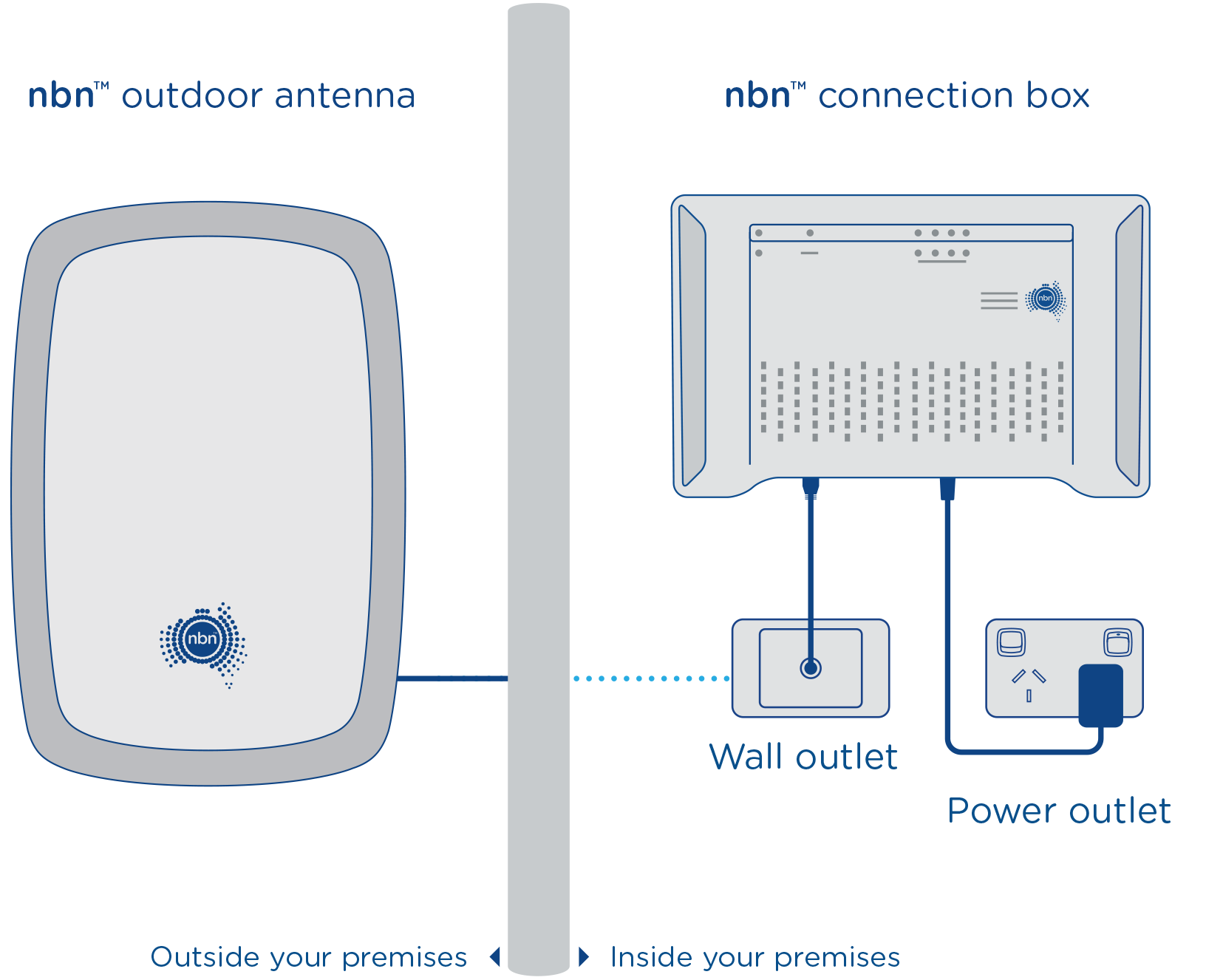
In simple terms:
- Outside antenna
- Then inside nbn connection box
- Then your router
If you live in a more regional area and can see an antenna mounted outside your home, that’s a strong sign you may have Fixed Wireless.
Fixed Wireless does not normally use a phone wall socket like FTTN or FTTB, and it does not use a cable wall outlet like HFC.
Frequently Asked Questions
How can I tell if I have Fixed Wireless nbn?
Look for a small panel-style antenna mounted on the outside of your home — on the roof or an external wall. Fixed Wireless is the only nbn technology that uses an outdoor antenna. Inside, you’ll also have an nbn connection box (usually white or black) that your router connects to.
What does a Fixed Wireless antenna look like?
It’s usually a rectangular panel about 30–40cm wide, mounted on an external wall or roof bracket. It looks a bit like a small satellite dish or a large rectangular panel. It’s aimed toward the nearest nbn tower.
How do I check if my address has Fixed Wireless nbn?
Go to nbn.com.au and type in your address. It’ll show your connection type. If it says “Fixed Wireless,” that’s your technology type. You can also call MATE on 13 14 13 and we can check for you.
Can I upgrade from Fixed Wireless to fibre?
In some cases, yes — but it depends on whether your area is included in an nbn upgrade rollout. nbn has been progressively expanding its fibre network. Check nbn.com.au or contact MATE to see if a fibre upgrade is available at your address.
What speeds are available on Fixed Wireless?
Most Fixed Wireless addresses can access nbn 25, nbn 50, and nbn 100 speed tiers. The tier available at your specific address depends on the tower capacity in your area. MATE will show you which options are available when you enter your address.
Does Fixed Wireless work in bad weather?
Generally yes — Fixed Wireless is designed to work in typical Australian weather conditions including rain and wind. In extreme weather (e.g. a severe storm directly overhead), you might see a brief dip in performance, but this is uncommon and usually short-lived.
Do I need a special router for Fixed Wireless?
You need a router that connects via ethernet to your nbn connection box — most modern routers do. MATE’s included modem/router is compatible with Fixed Wireless. You can also bring your own router if it supports the right connection type.
Will a technician need to come to my home?
If you’re setting up Fixed Wireless for the first time, yes — a technician is needed to install and align the outdoor antenna. If the nbn equipment is already installed at your address from a previous service, you may not need a technician visit.
Is Fixed Wireless the same as mobile internet?
No. Fixed Wireless uses the nbn network, not the mobile (4G/5G) network. The outdoor antenna at your home is permanently pointed at a fixed nbn tower. It doesn’t move with you and it’s a separate service from your mobile phone plan.
What’s the difference between Fixed Wireless and satellite nbn?
Fixed Wireless uses a tower within line of sight of your home — typically within 14km. Satellite (Sky Muster) connects to a satellite in orbit and is used in the most remote areas where no tower is nearby. Fixed Wireless generally has lower latency and more consistent speeds than satellite.


